 ›
PortaPack ›
Use Cases › 2m Repeaters
›
PortaPack ›
Use Cases › 2m Repeaters
2m Amateur Repeaters
Local ham radio conversations relayed over elevated antennas — ON0OS Ostend, ON0BAF Bruges, and more.
- Attach the telescopic antenna, extend to ~52 cm.
- Tune to 145.600 MHz — the most common Belgian 2m repeater output frequency.
- Mode: NFM. Bandwidth: 12.5 kHz. Squelch: off initially.
- LNA: 16 dB · VGA: 16 dB · Amp: OFF.
- Scan through 145.600, 145.625, 145.650, 145.675 MHz — these are the standard Belgian repeater output frequencies.
1What you'll hear
Repeaters relay voice conversations from licensed amateur radio operators. From Belgium's coastal and central regions, you're within range of several West Flemish and East Flemish repeaters, particularly those on elevated sites near the coast and in Ghent.
- Casual conversations — "ragchewing" between hams. Topics: radio equipment, local events, weather, travel.
- Contest exchanges — Brief callsign exchanges during contest weekends (particularly active on weekends).
- Repeater courtesy beep — A short tone after each transmission, confirming the repeater re-keyed. Normal and expected.
- ID tone — Most repeaters transmit their callsign in Morse code every 10 minutes, even when idle.
2m repeaters are most active in the mornings (commuters with mobile radios), evenings (post-work), and on weekend contest days. Midweek afternoons can be completely quiet. If nothing is heard after 10 minutes, the repeater is working but no one is transmitting — not a fault.
2Legal context
Amateur radio in Belgium (and everywhere) operates under the understanding that transmissions are not private. Listening without a licence is legal. The amateur radio community is generally welcoming to listeners and newcomers.
To transmit on amateur bands in Belgium, you need an ON-prefix callsign from the BIPT (Belgian Institute for Postal Services and Telecommunications). The exam tests basic electronics, regulations, and operating procedure. Worth pursuing if this hobby interests you — more info at uba.be (Union Belgique d'Amateurs).
3Antenna choice
The 2m band is 144–146 MHz in Europe. Quarter-wave for 145 MHz: 7500 ÷ 145 ≈ 51.7 cm.
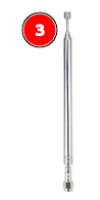
Telescopic antenna — extended to 52 cm
Range: 40 MHz – 6 GHz · Tunable
Extend to ~52 cm. Repeaters are elevated stations with high-power transmitters — they're designed to cover large areas. You'll typically receive the repeater output reliably from anywhere in its coverage area, even indoors. Placement matters less here than with satellite or airband work.
4How repeaters work — receiver perspective
Understanding the duplex system helps you receive the right thing:
| Signal | Frequency | What you receive |
|---|---|---|
| Repeater output | 145.6xx MHz | What the repeater re-transmits — what you want to monitor |
| Repeater input | 145.0xx MHz | Handheld operators transmitting TO the repeater (−600 kHz offset) |
To hear the full conversation, you can monitor both the input (145.0xx) and output (145.6xx). The output always carries the final retransmitted voice; the input carries the handheld side only.
CTCSS is required to access the repeater (open it for transmission). As a listener, you can hear all output transmissions without any CTCSS — just tune to the output frequency and leave squelch off. CTCSS is only relevant for transmitting.
5Workflows
From Mayhem: Receive → Audio. Mode: NFM. Bandwidth: 12.5k or 16k.
This is the most commonly used Belgian 2m repeater output frequency. Set gain: LNA 16 · VGA 16. Leave squelch off initially — you want to hear the repeater ID tone and any activity.
If 145.600 is quiet, step through the standard Belgian repeater output frequencies in 25 kHz steps: 145.600, 145.625, 145.650, 145.675, 145.700, 145.725 MHz.
Or use the Scanner app with start 145.600, stop 145.750, step 25k.
Once you confirm a repeater is present (ID tone or voice), set squelch to just above the noise floor so the audio mutes between transmissions. This makes listening comfortable.
Source: HackRF → Play. Centre frequency: 145.675 MHz. Sample rate: 2 MHz — this shows 144.675–146.675 MHz covering all Belgian repeater outputs simultaneously.
When a repeater keys up, you'll see a narrow blue stripe appear in the waterfall at its output frequency. Click it immediately to tune there. You may see 2–4 active repeaters if conditions are good.
Radio module: NFM · bandwidth 12500 Hz. Snap interval: 12500 to lock to channel boundaries.
6Recommendation
2m repeater monitoring is the original use case for a handheld scanner. The PortaPack is excellent here: tune to 145.625, set squelch, and leave it running. The SDR++ view is useful when you're surveying which repeaters are active in your area for the first time, but for everyday monitoring the PortaPack is more convenient.
7Belgian repeaters — West & East Flanders
Repeater frequencies and CTCSS tones occasionally change. Verify current information with the BARL (Belgian Amateur Radio League) repeater database at uba.be before assuming a repeater is offline.
| Callsign | Output | Input | CTCSS (for TX) | Location / Notes |
|---|---|---|---|---|
| ON0OS | 145.600 MHz | 145.000 MHz | 88.5 Hz | Ostend area — West Flanders coast |
| ON0BAF | 145.625 MHz | 145.025 MHz | 77.0 Hz | Bruges area — check uba.be for current status |
| ON0GNT | 145.650 MHz | 145.050 MHz | 88.5 Hz | Ghent — East Flanders, good coverage |
| ON0VL | 145.675 MHz | 145.075 MHz | 88.5 Hz | Roeselare area — West Flanders |
Repeater frequencies, CTCSS tones, and operational status change without notice. The table above is a starting point only. Check the current BARL repeater list at uba.be/en/ham-radio/repeaters for up-to-date information.
8What it looks like in the waterfall
A 2m NFM repeater transmission looks identical to maritime VHF — a narrow stripe, about 12–16 kHz wide, appearing when traffic is active. The key difference: after the operator finishes speaking, there's a brief courtesy tone (a short beep) before the repeater drops — visible as a very brief extra blip in the waterfall.
9Troubleshooting
No activity on any of the repeater frequencies
Completely normal — 2m repeaters can be silent for hours. Wait for an ID tone (Morse code identifier every 10 minutes); if you hear that, the repeater is working and waiting for traffic. Try different times: morning commute (07:00–09:00) and evening (17:00–20:00) are busiest.
I hear a voice but it cuts in and out
The repeater may be at the edge of your receiver's range. The repeater output is strong, but the operator's handheld transmitting to the repeater input might be too weak for you to receive directly — so you only hear the relayed output side. That's fine and expected — you're hearing the conversation through the repeater, not both ends directly.
I hear a short Morse code sequence then silence
That's the repeater identification — the callsign in Morse code (e.g. "ON0OS" in dots and dashes). This proves the repeater is operational. All amateur repeaters must transmit their callsign regularly by law. It's a feature, not a fault.
There's continuous noise on the output frequency — not a signal, just static that doesn't stop
Interference from another service, or the repeater itself may be in fault (stuck-open). If it lasts more than a few minutes, it's likely a different signal on a nearby frequency. Verify the exact frequency and use SDR++ to confirm the stripe is actually at 145.600 and not a few kHz offset.
10Next steps
- Session 08 — PMR446: Consumer walkie-talkies at 446 MHz. Similar NFM setup but frequency around commercial/event use.
- 70cm band (430–440 MHz): Belgian 70cm repeaters operate on similar principles at 430–440 MHz. The antenna length for 433 MHz is the same as the ISM sensors session — 17 cm. Many hams use both 2m and 70cm regularly.
- Get licensed: The HAREC (Harmonised Amateur Radio Examination Certificate) licence in Belgium requires passing a written exam on electronics, regulations, and radio procedure. Study materials at uba.be. Once licensed, you can transmit on these repeaters and join the conversations you've been listening to.
- Digital modes (DMR, C4FM, D-STAR): Many Belgian repeaters are transitioning to digital voice. SDR++ with a DSD+ or DSD plugin can decode these.