 ›
PortaPack ›
Use Cases › ADS-B
›
PortaPack ›
Use Cases › ADS-B
Track Planes on a Map
Every aircraft squawking above you — decoded, identified, plotted. 1090 MHz, live, no account needed.
- Attach the stubby rubber duck antenna (no extension needed).
- Mayhem: Receive → ADS-B Rx.
- Frequency is preset to 1090.000 MHz — leave it there.
- LNA: 32 dB · VGA: 8 dB · Amp: OFF.
- Within 30 seconds, aircraft callsigns and altitudes start appearing on the map.
1What you'll see
ADS-B is a mandatory broadcast system. Every commercial aircraft transmits its GPS position, altitude, heading, speed, and flight number every half second. You don't request it — the aircraft just shouts it constantly.
In Mayhem's ADS-B Rx app, you'll see a live overhead view: small plane icons appearing, moving, labelled with callsigns like BAW123 or VLG789. Altitude in feet, speed in knots.
Belgium sits directly under some of the busiest European routes — Amsterdam–London, Paris–Frankfurt, transatlantic approaches to Brussels. You can typically see 20–60 aircraft simultaneously in good conditions, even at ground level. If you're not seeing anything within a minute, something is wrong with the setup.
2Legal context
ADS-B is the least ambiguous session in this series — it is explicitly designed for public reception.
ADS-B is a public broadcast. Aviation regulators require aircraft to transmit it so that other aircraft, controllers, and ground stations can receive it. Websites like Flightradar24 and FlightAware are built entirely on crowdsourced ADS-B reception. You're doing the same thing they do.
Never transmit on 1090 MHz. Injecting fake aircraft positions is a serious aviation safety offence and is aggressively prosecuted. The receiver-only restriction applies absolutely here.
3Antenna choice
ADS-B is at 1090 MHz. Quarter-wave formula: 7500 ÷ 1090 ≈ 6.9 cm — barely longer than a thumb. You want a short antenna here.
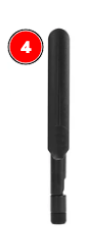
Stubby rubber duck — use as-is
Best above ~1 GHz · no adjustment needed
The short rubber duck in your kit is designed for exactly this frequency range. Use it as-is — no extension, no telescoping. The telescopic antenna fully collapsed is also acceptable (~7 cm).
Do not connect the external LNA module for ADS-B. 1090 MHz is a strong signal and the extra amplification causes overload and false decodes. Keep the signal chain: antenna → SMA → PortaPack/HackRF.
ADS-B is line-of-sight. The antenna needs a clear view of the sky. Each metre higher = more aircraft visible. A window ledge beats a desk; outside on a balcony beats a window ledge. In an urban interior you may still see 10–20 aircraft; outside with a clear sky horizon you'll see 60+.
4Workflows
From Mayhem home: Receive → ADS-B Rx. The frequency is already set to 1090.000 MHz — do not change it.
LNA: 32 dB · VGA: 8 dB · Amp: OFF
If you see many ghost decodes or ICAO addresses flickering rapidly → lower LNA to 24. If nothing appears after 60 seconds → try LNA 40.
Aircraft appear as small symbols with their ICAO address and altitude. The screen updates every second. Near Belgium you can easily have 20+ aircraft visible simultaneously.
Press the encoder wheel to switch between map and list view. The list shows: ICAO code, callsign, altitude, speed, country. Scroll with the encoder to browse aircraft.
dump1090-fa (or readsb) installed. On Debian/Ubuntu/Kali: sudo apt install dump1090-fa. HackRF drivers working — verify with hackrf_info first.
Open a terminal:
dump1090-fa --device-type hackrf --gain 40 --net --interactive
You'll immediately see raw Mode S output in the terminal as aircraft are decoded.
In your browser, go to http://localhost:8080. A map centred on your location shows all decoded aircraft as plane icons. Click any icon for flight details: callsign, origin/destination, altitude, speed, track.
If the terminal shows many CRC errors → lower --gain to 32 or 24. If aircraft are sparse → raise to 48. Typical sweet spot for HackRF: 40–44.
Alternative: --gain -10 triggers automatic gain control (AGC) — a decent starting point.
tar1090 is a modern web frontend for dump1090-fa with history trails, range rings, and statistics. Install with the one-liner from its GitHub page and restart dump1090. The URL stays localhost:8080.
5Recommendation
Seeing a live aircraft map appear on a pocket-sized device with no internet, no subscription, no account — just a metal box and an antenna — is genuinely impressive. Mayhem's ADS-B Rx app is polished and works well.
Move to the laptop + dump1090 workflow when you want history trails, range statistics, aircraft photo lookups, or you want to contribute to Flightradar24 / FlightAware as a feeder station (which earns you a free premium account, by the way).
6What the data looks like
| Field | Example | Notes |
|---|---|---|
| ICAO address | 4CA8B4 | Unique hardware ID burned into transponder. Never changes. |
| Callsign | RYR1234 | Flight number (Ryanair 1234). Only present when pilot sets it. |
| Altitude | 37000 ft | Barometric altitude (Mode C). GPS alt also available in ADS-B Out. |
| Speed | 445 kts | Ground speed in knots. |
| Track | 247° | Heading over ground in degrees. |
| Country | Ireland | Derived from ICAO prefix. Not the current position. |
7What it looks like in the waterfall
Mode S bursts are very short — about 120 microseconds long. In a waterfall view at 1090 MHz you'll see brief bright flashes appearing at random intervals, typically 1–3 per second from a nearby aircraft.
You won't decode ADS-B by looking at the waterfall — the signal is too brief and the data is binary. The waterfall is useful only to confirm reception; use ADS-B Rx or dump1090 for actual decoding.
8Troubleshooting
No aircraft appearing after 60 seconds
1. Try gain LNA 40 (PortaPack) or --gain 48 (dump1090).
2. Check antenna — the stubby rubber duck must be SMA-connected. Don't use the telescopic extended to full length; it's too long for 1090 MHz.
3. Move antenna to a window or outside. Inside a room with no sky view reduces range dramatically.
4. Try daytime — overnight hours still have traffic but less than daytime peaks.
Many decodes but callsigns are all zeros / garbage ICAO addresses
Front-end overload — gain too high. Lower LNA to 24 or 16. Too much gain causes the HackRF's ADC to clip and produce invalid data that passes the basic length check but fails CRC.
dump1090 says "No supported RTLSDR devices found"
dump1090-fa was compiled for RTL-SDR, not HackRF. Use the --device-type hackrf flag explicitly. Alternatively install readsb which has better multi-device support: readsb --device-type hackrf --gain 40 --net.
Mayhem ADS-B Rx shows map but no plane icons
The map needs decoded frames to place icons. If the frequency is correct (1090.000 MHz) and gain is reasonable (LNA 32), wait 30–60 seconds. If still nothing, check the antenna connection. The PortaPack will show raw hex frames at the bottom of the screen when it receives any Mode S — if that list is empty, nothing is being received.
Only seeing aircraft directly overhead, not at a distance
Normal with a indoor or ground-level antenna. ADS-B is line-of-sight; the curvature of the earth means an aircraft at 35,000 ft is only visible to about 400 km radius from your antenna — but a low aircraft 50 km away may be below your horizon if you have buildings or hills in the way.
To increase range: higher antenna placement, outdoor mounting. A simple quarter-wave spider antenna on a mast can achieve 300–400 km range.
SDR++ doesn't show anything useful at 1090 MHz
That's expected — SDR++ alone can't decode Mode S. You need dump1090-fa or readsb running separately to actually decode the data. SDR++ is not the right tool for ADS-B; it's for audio demodulation and spectrum analysis, not packet decoding.
9Next steps
- Feed Flightradar24 or FlightAware: Both have simple feeder clients that use dump1090 output. You get a free business account in exchange for your data. Guide on their respective sites.
- Session 04 — 433 MHz sensors: Completely different frequency and protocol — decode the wireless sensors around your house.
- MLAT (Multilateration): If you feed to FlightAware and other feeders near you are also feeding, FlightAware can locate aircraft without ADS-B using time-difference-of-arrival. Your receiver participates in the network.
- Mode S Beast / Beast protocol: Connect a dedicated ADS-B antenna (coax to rooftop) and run a permanent receiver. The HackRF is overkill for ADS-B — a €25 RTL-SDR dedicated to 1090 MHz works better for permanent deployments.